
Vault is periodically purged to delete unnecessary versions of files. To save all needed file versions from a purge, use the Revision Scheme within Vault. This method ensures all versions you designate will be available when and if you need them at a later date.
Follow these steps to ensure that revision files do not get purged from Vault:
1. Open Vault Explorer.
2. Select the file(s) to add a revision number.
3. Click the “Revise…” button on the ribbon.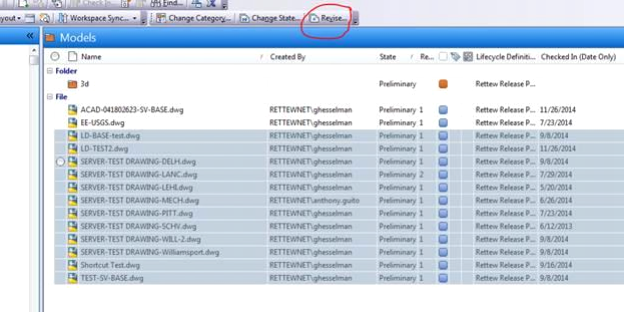
4. In the Revise dialog box, choose Primary in the dropdown, and enter the comment to display for that revision number.
5. Select OK.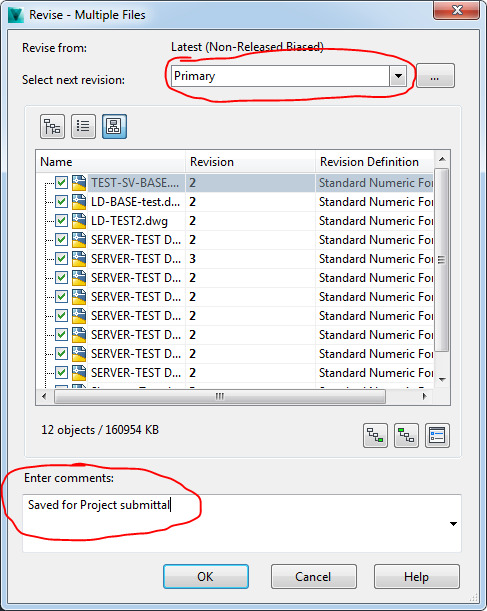
6. Under the history of each file added, the new revision comment will display.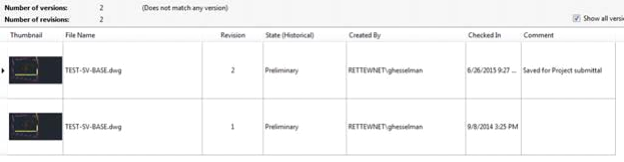
Comments
0 comments
Please sign in to leave a comment.